
Costliest Objects
The Costliest Objects panel in the sidebar’s HeatmapPilot tab lists the 8 objects that cost the most in the view this viewport shows. It starts once you pick a view, and follows the viewport when you stop moving it.
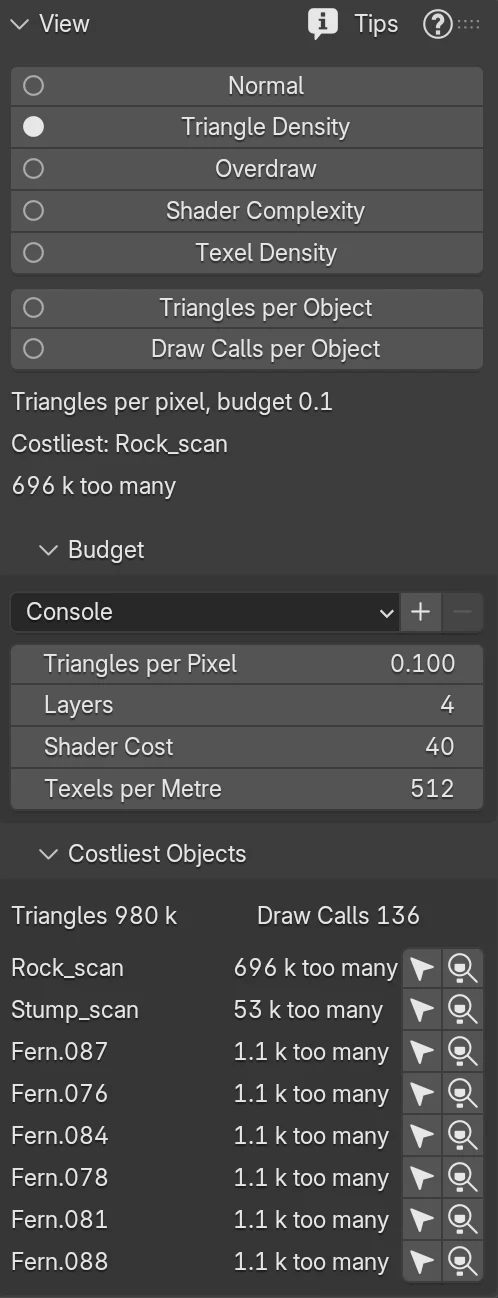
At the top, the panel shows the Triangles and Draw Calls of everything in view. Each row then shows the number the list is ordered by:
| View | Each row shows |
|---|---|
| Triangle Density | The triangles over the budget for the pixels the object covers, such as “65 k too many” |
| Overdraw | The pixels the object draws, hidden ones included |
| Shader Complexity | The object’s share of the view’s estimated shading cost, such as “63% of cost” |
| Texel Density | How far the object is off the budget, such as “7.8x too high” or “1.9x too low” |
| Triangles per Object | The object’s triangles |
| Draw Calls per Object | The object’s draw calls |
On Triangle Density and Texel Density, the list leaves out what is on budget. When nothing is over, the panel says so. Texel Density leaves out objects smaller than 100 pixels on screen.
Select and Frame
Section titled “Select and Frame”The two buttons at the end of each row select the object and make it active. The second also zooms the viewport to it. Both work in Object Mode, and Ctrl+Z brings back your selection.
An object you hide or remove after the list was made stays in its row, greyed, and says hidden, unhide it or removed. Move the viewport, and the list is made again.
The costliest line in the View panel shows the first row of the list.